
October 23, 2026 · CHARITY
Business Messaging: How Routing Works for Small Teams
Business messaging works best when every new chat has an owner. Learn the four routing modes, round robin, manual, keyword and keyword plus round robin, and which one fits your small team.

Picture three people sharing one inbox. A customer message lands. One person opens it, gets distracted, closes the tab. Another assumes a colleague already replied. Twenty minutes pass, then an hour, and the customer has already messaged a competitor. The problem was never effort. It was that nobody actually owned the chat.
Business messaging gets easier when every new chat has a clear owner from the first minute. That ownership comes down to routing: the rule that decides who gets each incoming conversation. Get the rule right and messages stop slipping through cracks. Get it wrong, or skip it entirely, and your shared inbox turns into a guessing game.
This post walks through the four routing modes most small teams actually use, how each one behaves, and which fits the way your team is set up.
Why routing matters more than you think
There is a hard limit hiding behind every customer conversation on WhatsApp. Once a customer messages you, you have a 24 hour window to reply freely. After that window closes, you can only send pre-approved template messages, which cost more and feel stiffer. You can read the exact rules in the WhatsApp Business Platform documentation on customer service windows.
So speed is not a nice-to-have. A message that sits unassigned for six hours has already burned a quarter of your reply window. Routing is the mechanism that gets a message in front of a real person fast, before that clock does any damage.
Routing also fixes a quieter problem: accountability. When a chat has one named owner, you know exactly who to ask about it. We covered the ownership side of this in Business Messaging: Who Owns Each Customer Chat?, and routing is the engine that makes ownership automatic instead of something people negotiate every morning.
Business messaging routing modes, explained
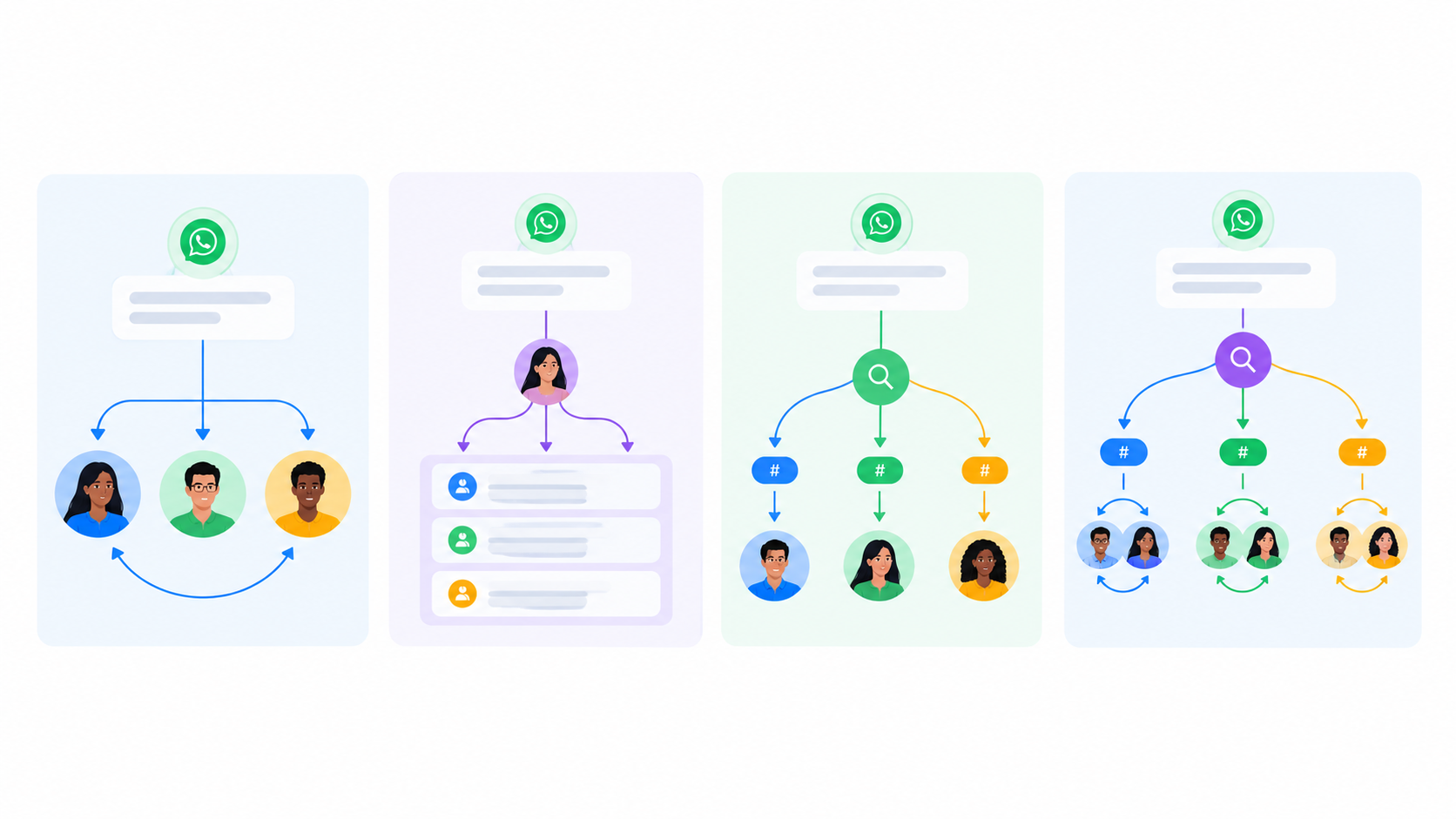
There are four common modes. Each one answers the same question differently: when a new conversation arrives, who should it go to?
1. Round robin
Round robin spreads conversations evenly. The first message goes to Agent A, the next to Agent B, the next to Agent C, then back to A, and so on. It is the simplest fair split there is.
This works well when your team members are interchangeable. If anyone on the team can handle any question, round robin stops the loudest or fastest person from hogging every chat. It also quietly solves a problem we wrote about in our piece on lead assignment, where the best leads kept landing with whoever happened to be quickest on the keyboard. That is not fairness, it is a race, and round robin ends the race.
The limit is obvious. Round robin does not care what the message is about. A technical support question and a billing complaint get distributed the same way, even if only one person on the team actually handles billing.
2. Manual assignment
With manual routing, new conversations land in a shared queue and a person decides where each one goes. A team lead or a front-desk agent reads the message and assigns it to the right owner.
Manual gives you full control. Nothing is handled by a rule that cannot read context, so a human judges each case. For small, low-volume teams this can be perfectly fine. If you get fifteen messages a day, assigning them by hand takes minutes.
The trade-off is that it does not scale and it depends on someone always being there to triage. Miss a lunch break and the queue piles up. Manual routing is a good starting point and a poor long-term home.
3. Keyword routing
Keyword routing reads the incoming message and sends it based on what the customer actually wrote. A message mentioning "refund" goes to the accounts person. A message mentioning "demo" or "pricing" goes to sales. Anything with "not working" or "error" goes to support.
This is where routing starts to feel smart. Instead of splitting blindly, you match each conversation to the person best equipped to answer it. Customers get a relevant reply on the first attempt, which is the whole point.
Keyword routing shines when your team has clear specialties. A three-person shop where one handles sales, one handles support, and one handles billing is the ideal case. The catch is that customers do not always use your keywords. Someone might type "my order is broken" when your rule only watches for "faulty," so you need a sensible fallback for messages that match nothing.
4. Keyword plus round robin
This is the mode most growing teams land on. It combines the two above. First, the system reads the message and sorts it by keyword into the right department. Then, within that department, it distributes evenly using round robin.
Say two people handle support and two handle sales. A message about a bug gets routed to support by keyword, then shared fairly between the two support agents by round robin. You get the right department and an even workload at the same time.
For most small teams with any kind of specialization, this is the setup worth aiming for. It respects skill and spreads the load, which is exactly what a shared inbox needs once it gets busy.
How to pick the right mode
Match the mode to how your team is organized, not to what sounds most advanced.
Everyone can handle anything: start with round robin.
Very low volume, or you want human judgment on every chat: manual, at least until volume grows.
Clear specialists, one person per area: keyword routing.
Specialists with more than one person per area: keyword plus round robin.
A useful habit is to review your routing every few months. Teams change. The person who did billing solo now has a partner, and suddenly plain keyword routing leaves one of them overloaded while the other sits idle. The mode that fit six months ago may not fit now.
Getting it running
Knowing how to route customer messages automatically is less about picking the perfect mode on day one and more about setting something sensible and adjusting as you learn. Most teams start with round robin, add keywords once specialties become clear, then combine the two as they hire.
The tool matters too. Good conversation routing software should let you switch modes without rebuilding everything, set fallbacks for unmatched messages, and show you who owns what at a glance. If changing a rule means calling support or editing a config file, it is too rigid for a small team that needs to move fast.
Strong business messaging is not about replying faster through sheer hustle. It is about building a quiet system that puts each conversation in the right hands before anyone has to think about it. Pick the routing mode that matches your team today, watch how it holds up for a month, and change it the moment it stops fitting. You can see how Vira handles all four modes in one place when you are ready to set yours up.